
Summary
This post explains whether you can transfer website hosting and, more importantly, how to do it safely without disrupting your business. Written for business owners who feel stuck with slow, unreliable, or poorly supported hosting, it walks through what a hosting transfer actually involves, why many businesses outgrow their original hosting setup, and the risks of moving without proper technical oversight. Using real-world examples from CMS Live, the post highlights how careful planning, server-level expertise, and ongoing support can improve performance, security, and reliability. It also helps readers understand what to look for in a hosting partner who takes full responsibility for their website.
You will learn
- Whether and how website hosting can be transferred safely
- What can go wrong during a hosting move – and how to avoid it
- What to look for in a hosting provider who truly manages everything
Can you transfer website hosting?
Yes – and for most established businesses, it’s not just possible, it’s often overdue.
We speak to business owners every week who feel stuck with their current hosting company. Their website is slow. Support tickets go unanswered. Updates feel risky. Nobody quite knows how the server is set up anymore – or who’s actually responsible when something breaks.
The good news is this: website hosting can be transferred, and when it’s done properly, it can dramatically improve your site’s performance, security, and reliability.
In this guide, I’ll explain how website hosting transfers work, what’s involved behind the scenes, and what business owners should look out for – using real examples from clients we’ve moved from underpowered, poorly managed hosting to CMS Live.
What does it mean to transfer website hosting?
Transferring website hosting means moving your website files, databases, email (if applicable), and configuration from one hosting provider to another.
It’s important to understand that this is not just a copy-and-paste job.
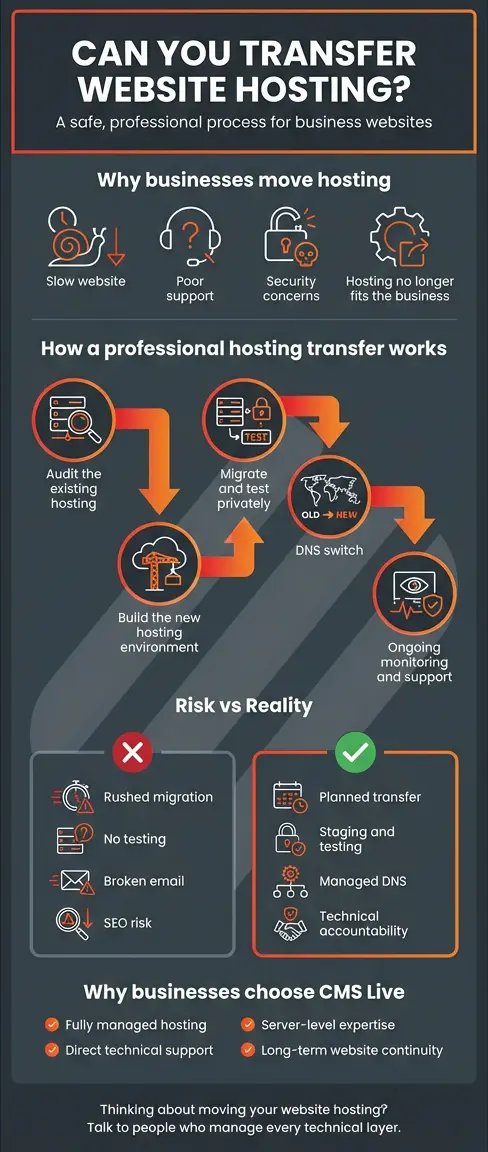
A proper hosting transfer involves:
- Migrating website files and databases safely
- Reconfiguring server settings to match your site’s needs
- Testing functionality before anything goes live
- Managing DNS changes so visitors aren’t disrupted
- Ensuring backups, security rules, and monitoring are in place
When businesses try to do this without technical oversight, things can go wrong fast.
Why business owners usually decide to transfer hosting
Most clients don’t come to us wanting to move hosting. They come because something isn’t working anymore.
Common reasons include:
-
Slow website performance despite a modern design
-
Unresponsive or outsourced support with no accountability
-
Security concerns after hacks, malware warnings, or downtime
-
Outgrowing shared or reseller hosting
-
A web designer or developer who has disappeared or changed roles
We often find that the hosting was chosen years ago based on price, not suitability – and the business has simply outgrown it.
This is exactly why we created our fully managed hosting services at CMS Live.
Can you transfer website hosting without downtime?
Yes – when it’s planned and managed properly.
At CMS Live, we build the new hosting environment before anything is switched over. This allows us to:
-
Test the site on the new server
-
Resolve compatibility issues early
-
Optimise performance settings
-
Put security protections in place
Only once everything is verified do we update the DNS records to point traffic to the new server. For most sites, visitors never notice the change.
This approach is especially important for eCommerce sites, booking systems, and high-traffic business websites.
A real-world example: moving away from insufficient hosting
A recent client came to us with a WordPress site that was crashing during peak hours. Their previous host blamed “traffic spikes” and suggested upgrading to a higher-priced plan – without explaining what that would actually change.
When we reviewed the setup, we found:
-
Shared hosting with hundreds of sites on the same server
-
No server-level caching
-
Outdated PHP versions
-
No meaningful security hardening
We migrated the site to our CMS Live hosting infrastructure, rebuilt the environment to suit the site’s actual usage, and added proactive monitoring.
The result?
-
Faster page loads
-
No more unexplained downtime
-
Clear accountability for ongoing support
This kind of outcome is exactly why businesses choose to switch to premium hosting rather than staying stuck with unsuitable providers.
What’s actually involved in a professional hosting transfer?
Here’s what should always be included when transferring website hosting:
Pre-migration audit
Before anything moves, the site needs to be understood:
-
Platform (WordPress, Magento, custom CMS)
-
PHP and database requirements
-
Email dependencies
-
Traffic patterns and peak usage
This step is often skipped by budget hosts – and that’s where problems start.
-
Secure migration and testing
We migrate files and databases into a staging environment, test everything thoroughly, and only proceed once the site behaves exactly as expected.DNS and live switch
DNS changes are timed carefully to minimise disruption. We monitor the switch closely and remain available in case any adjustments are needed.Ongoing protection and support
After the move, the real value begins – proactive maintenance, monitoring, backups, and human support.
This ties directly into our Website Care & Continuity Service, which ensures your site remains supported even if your internal team changes.
Is transferring hosting risky?
It can be – if it’s rushed, automated, or handled by someone without server-level expertise.
The risks usually come from:
-
Missing database tables
-
Incorrect file permissions
-
Email outages
-
Broken forms or integrations
-
SEO disruption due to poor DNS handling
That’s why businesses looking for long-term stability usually prefer a hosting partner who also provides website technical support and understands the full lifecycle of a website.
FAQs: Website hosting transfers
Why businesses move to CMS Live for hosting
Businesses don’t move to us just for faster servers. They move because:
-
We understand every technical layer of a website
-
Hosting, support, and security are handled together
-
You deal directly with the people responsible for your site
-
We proactively manage issues – not just react to them
Related Reading
Website Continuity Support for Businesses: The Constant Your Website Needs (Even When Your Team Changes)
Choosing a Website Hosting Company: What Business Owners Need to Know
Final thoughts
So, can you transfer website hosting?
Absolutely – and when it’s handled by a team that understands hosting, security, and long-term website support, it’s often one of the best decisions a business can make.
If your current hosting feels fragile, unsupported, or simply no longer fit for purpose, it may be time to rethink it.